
One thing I’d really like NeoMem to do is be able to publish your information to a website. And then keep the website in synch with your local datastore, if people edit or add information there. Here’s a simplified diagram of what it’ll look like…
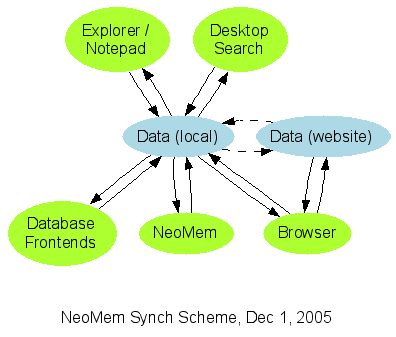
I figure it would be best if I concentrated on the browser interface at the moment, since that will be the most useful, eg for publishing all the project-related information for NeoMem to this site. And it would also function as the user interface on the local data store, until the new Ruby-based interface gets up to speed. The browser interface will probably be based on Ruby on Rails, or possibly Nitro. We’ll see how that goes.
I’ve been avoiding the old C++ code - it’s really not a pleasant thing to deal with, and tracking down old bugs is just not what I want to deal with at the moment (massive time drain). I’d rather just get the “Export All to CSV” working, and then migrate all my data to the new version. Abandon ship! If there’s enough interest in having a really light, C++ based UI on the data then the old program could be fixed up, migrated to wxWidgets and made cross-platform. It might be useful, for a PDA or something.
So the current order of action is:
- Make a Ruby on Rails interface on the data (currently all stored in one giant table, ‘object’)
- Get “Export All” working on the C++ UI
- Get the skeleton of a Ruby/wxWidgets plugin-based user interface working
Sorry to be leaving all those bugs in there, for now… I just don’t seem to have the time or energy to deal with them, and maybe it’s better that I concentrate on the new version anyway… My lease is up at the end of January, and I’ll probably be moving to Austin - I’m planning to digitize a lot of the things in my apartment (file cabinets, notebooks, artwork, etc), with a digital camera mounted on a 2×4, so I won’t have to move so much stuff. The nine bookshelves of books will have to wait a while for their turn, unfortunately…
Tags: No Tags
4 comments
Comments feed for this article
December 5th, 2005 at 5:02 am
milan
hello, I’m really happy that you’ve re-started this project - I’ve always beleived in it and hoped that neomem will evolve in modern app - because original idea is genious, just architecture is old.
If you will build good backend and buisness logic serverside, than building various clients (exe, flash, ajax etc.), will be peace of cake.
good luck!
December 5th, 2005 at 1:50 pm
bburns
Hi Kosir, I remember you - thanks for the encouragement
And yeah, I can’t wait to have a nice Flash interface on all this information…
Brian
December 13th, 2005 at 6:54 am
Joyhn
This is what I’ve been looking for as I’m working on several locations (and so different computers)… and I do prefer desktop based apps.. so this would be best of both worlds…
Great work, keep it up buddy
December 13th, 2005 at 7:06 pm
bburns
Thanks Joyhn